


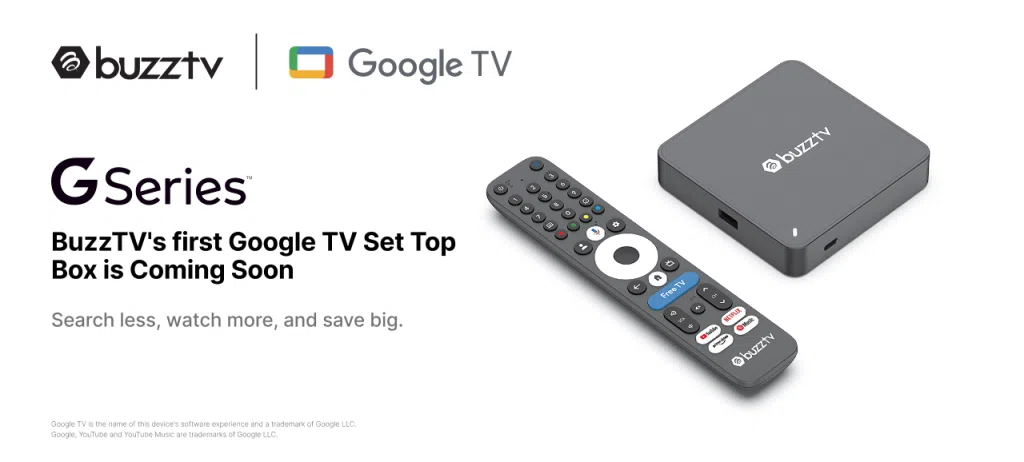
BuzzTV used CES 2026 to make an important move. The brand unveiled its first certified Google TV streaming box, alongside the new BuzzTV Classic AI TV Box. Both devices mark a clear step forward. More performance. More AI features. And tighter integration with the BuzzTV 6 app. Although full specifications are still forthcoming, key details have already been confirmed.
What You need to know
- BuzzTV unveils its first certified Google TV streaming box
- Android 14, Amlogic S905X5M and S905X5 platforms
- Dolby Vision, Dolby Atmos, and AI Super Resolution support
- BuzzTV 6 app pre-installed with major UI upgrades coming
- Both models are expected to launch in March
BuzzTV’s first Google TV Box with Android 14, S905X5M SoC, AI-SR upscaling, Dolby Vision and Atmos, and WiFi 6
BuzzTV’s first certified Google TV Box fills a gap many users noticed. Until now, the brand focused mainly on Android-based IPTV streamers. This new model changes that.
At its core sits the Amlogic S905X5M SoC. It uses a quad-core Cortex-A55 CPU clocked up to 2.5GHz, paired with a Mali-G310 V2 GPU. The result is smooth, responsive performance for everyday streaming and apps.
Video support is a strong point. The box handles AV1, H.265, and VP9 with ease. It delivers crisp 4K playback at up to 75 fps. HDR10+ and Dolby Vision improve contrast and color depth. Dolby Atmos adds immersive, cinema-style audio.
AI Super Resolution 2 (AI-SR) plays an important role here. Thanks to its inline processing, AI-SR upscales content instantly. There is no noticeable delay. Lower-resolution streams look sharper, cleaner, and closer to 4K or even 8K output.
The hardware configuration includes 4GB of RAM and 64GB of eMMC storage. The system runs Google TV based on Android 14. Connectivity is modern and complete. You get dual-band WiFi 6 with 2T-2R antennas, Bluetooth 5.2, and Gigabit Ethernet.
Ports include HDMI 2.1, optical SPDIF, USB, USB-C data, USB-C power, a microSD card slot, and LAN. The G-Series package includes a power adapter, an HDMI cable, a quick guide, batteries, and the G21 Bluetooth voice remote. The G-series box is expected to be available in March.
BuzzTV AI Classic S905X5 Android 14 Streaming TV Box Overview Features
The BuzzTV Classic AI TV Box keeps a familiar look. It closely resembles the current Classic model, with a subtle blue graphic on the top cover. The real upgrade is inside.

This version uses the Amlogic S905X5 SoC. Built on a 6nm process, it features a quad-core Armv9 CPU, likely based on Cortex-A510 cores. Performance exceeds 40,000 DMIPS, which translates into faster navigation and smoother multitasking.
Graphics come from the Mali-G310 V5 GPU running at 1GHz. It is designed to handle 4K HDR user interfaces without slowdowns. AI Super Resolution is also included. It intelligently enhances video quality, turning 1080p streams into near-4K output.
The S905X5 chipset supports modern codecs such as AV1 and H.266/VVC at up to 4K 60 fps with 10-bit color depth. Legacy formats like VP9, H.265, and H.264 are also covered. The Classic AI runs Android 14 and includes the BuzzTV 6 app pre-installed. We have already announced the new multi-server feature in the BuzzTV 6 app. More updates and new features are coming, and we will cover them later in this article.
Memory and storage match the Google TV model. You get 4GB of RAM and 64GB of eMMC storage. While connectivity details are not fully confirmed, WiFi 6, Bluetooth 5.2, and Gigabit Ethernet are expected. The Classic AI S905X5 streaming box will ship with the BuzzTV BT-350 backlit Bluetooth voice remote.
Pre-orders are now open for both the BuzzTV Classic AI and the G-Series TV Box.
BuzzTV 6 App: Major Home Screen Upgrades Coming
BuzzTV is not stopping at hardware. The BuzzTV 6 app is evolving fast, and a major home screen update is on the way. These changes will roll out to all compatible models, including PowerStation 6 and Classic AI devices.
Users will soon gain deeper control over the interface. You can customize top tabs and choose which three appear on the home screen. Options include My Channels, My VOD, TV Series, Radio, and PVR.
Home Screen Autorotate adds a content carousel. When enabled, live TV channels can autoplay previews directly in the background. Custom rows are also coming. You can create, rename, reorder, or delete rows for favorites, recently watched content, apps, or custom groups.
Wallpaper options expand significantly. Users can choose theme colors, local images, BuzzTV wallpapers, TMDB artwork, or browse thousands of images via Unsplash and Pexels integration.
Other improvements add real usability. Picture-in-picture previews appear in My Channels. Apps can launch automatically at startup. PIN locks bring parental controls to individual apps. Favorites rows become easier to manage. Top tabs are now clickable. VOD and series get full info pages via the INFO button. Custom channel groups sync into My Channels. The PVR player has been refreshed with better controls and navigation.
More details are expected soon. In the meantime, take a look at the recently unveiled E5 SE Signature Edition IPTV streamer.
Last updated on March 26th, 2026 at 01:31 pm







Discussion about this post